How to Embed Your Social Media Wall on Any Website in Under 5 Minutes
Your Instagram feed is popping. Your TikTok is gaining traction. Your YouTube channel has a growing library of content. But when someone visits your actual website, none of that energy is visible. The site feels static, a little lifeless, disconnected from the brand you have been building across platforms.
That is the gap a social media wall fills. It pulls your live social content — posts, photos, videos, reviews — directly onto your website, keeping things fresh without you manually updating a single thing. And the best part? You do not need a developer, a weekend of free time, or any coding knowledge to set one up.
In this guide, we will walk through the entire process of embedding a social media wall on any website using CollectSocials. From signup to a live, working feed on your site — all in under five minutes.
What Is a Social Media Wall (and Why Should You Care)?
A social media wall is a live, embedded display of content pulled from your social media accounts. Instead of visitors having to find you on Instagram, then check your YouTube, then look up your Facebook page, they see everything in one unified, auto-updating feed right on your site.
Think of it as a highlight reel of your entire social presence, displayed wherever you want it on your website.
Here is why it matters. Websites with dynamic, regularly updated content keep visitors engaged longer. When a visitor lands on your homepage and sees real posts from real customers using your product, that is social proof working in real time. According to research, websites featuring user-generated content see significantly higher conversion rates compared to those without it. A social media wall delivers that effect with virtually zero ongoing effort from your team. This is why unified social feeds are so effective at building trust.
What a social wall looks like
Watch your content come to life. This animation shows a stylized browser window where social media post cards appear one by one in a grid layout. Each card fades in and slides upward into position, displaying a platform logo badge (Instagram, TikTok, YouTube, X, Google Reviews, Facebook) that identifies its source. The cascade effect demonstrates how posts populate your social wall in real-time—not as a static gallery, but as a living, updating feed.
This is the end result visitors see on your website: a professionally designed, multi-platform social proof display that updates automatically. No manual copying. No outdated screenshots. Just real posts from your actual social accounts flowing into a grid that makes your site feel active and credible. The animation captures that moment of transformation when scattered social content becomes a cohesive, branded wall on your homepage.
Before You Start: What You Will Need
The setup is minimal. Here is everything you need to get started:
A CollectSocials account. The free plan gives you 3 sources and 2,000 monthly page views, which is more than enough to test things out and get your first wall live.
Access to your website's backend. Whether you are on WordPress, Shopify, Squarespace, Wix, Webflow, or a custom-coded HTML site, you just need the ability to paste a small snippet of code. If you can edit a page, you can do this.
Your social media accounts. Know which platforms you want to pull content from. CollectSocials supports Instagram, TikTok, YouTube, Facebook, X (Twitter), LinkedIn, and more.
That is it. No plugins to install (unless you want one), no API keys to configure, no developer handoff required.
Step 1: Sign Up and Create Your First Feed
Head over to CollectSocials and create a free account. No credit card is needed.
Once you are in the dashboard, you will see an option to create a new feed. Click it. This is where you will define what content your social wall displays. Give your feed a name — something simple like "Homepage Social Wall" or "Customer Showcase" — and move to the next step.
The whole signup-to-dashboard flow takes about 30 seconds.
Step 2: Connect Your Social Media Sources
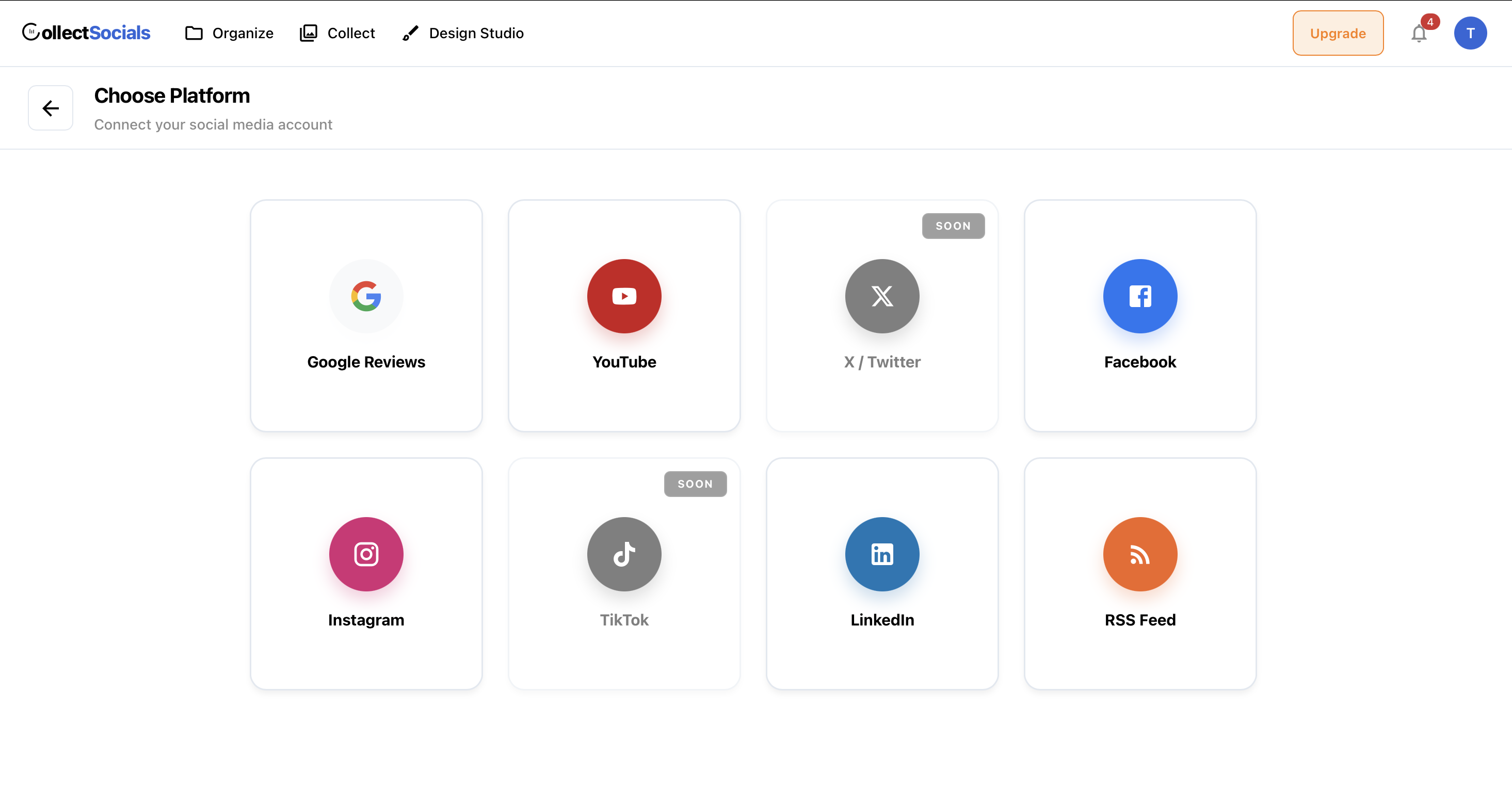
This is where the magic happens. CollectSocials lets you pull content from over a dozen platforms, including Instagram, TikTok, YouTube, Facebook, X (Twitter), LinkedIn, Pinterest, RSS feeds, and more.
Choose the platform you want to start with, then select your source type. You might pull from a specific profile, a hashtag, or even a tagged mention. For example, if you run a clothing brand, you might aggregate posts from your own Instagram handle plus any posts tagged with your branded hashtag.
Each source you add becomes part of your unified feed. On the free plan, you get 3 sources. If you need more, the Pro plan at $19/month gives you 5 sources with custom CSS and keyword filters, and the Business plan at $44/month supports 15 sources with AI-powered moderation.
Adding a source typically takes one or two clicks — select the platform, authenticate or enter the handle/hashtag, and confirm.
Feed
How connection works
Six platforms, one central hub. This animation visualizes the connection process. Social platform icons (Instagram, TikTok, YouTube, X, Facebook, LinkedIn) are arranged in a row at the top. When the animation runs, arrows draw from each icon down to a central "Feed" hub. As each arrow completes, the platform icon bounces—confirming the connection. When all six are connected, the central hub pulses to show it's active and syncing.
This represents what happens behind the scenes when you set up your social wall. Instead of managing six separate widgets or manually embedding posts from each platform, you connect all your accounts to one centralized feed. The hub becomes your single source of truth—pull from it once, and your website displays content from all connected platforms. The bouncing icons and pulsing hub aren't just visual flourish; they represent the relief of consolidation.
Step 3: Choose a Layout and Customize Your Wall
CollectSocials offers a growing library of layouts and themes designed to look polished on any website. You are not stuck with a single generic grid. Choose from masonry grids, carousels, classic walls, list views, and more — with additional layouts being added regularly.
This is one area where CollectSocials stands apart from competitors. The layouts are not afterthoughts. They are designed with modern UI principles, giving you feeds that actually look like they belong on a well-designed website rather than a clunky embed from 2018.
Once you pick a layout, you can customize colors, card styles, spacing, and typography to match your brand. On Pro and higher plans, you also get full custom CSS access for pixel-perfect control.
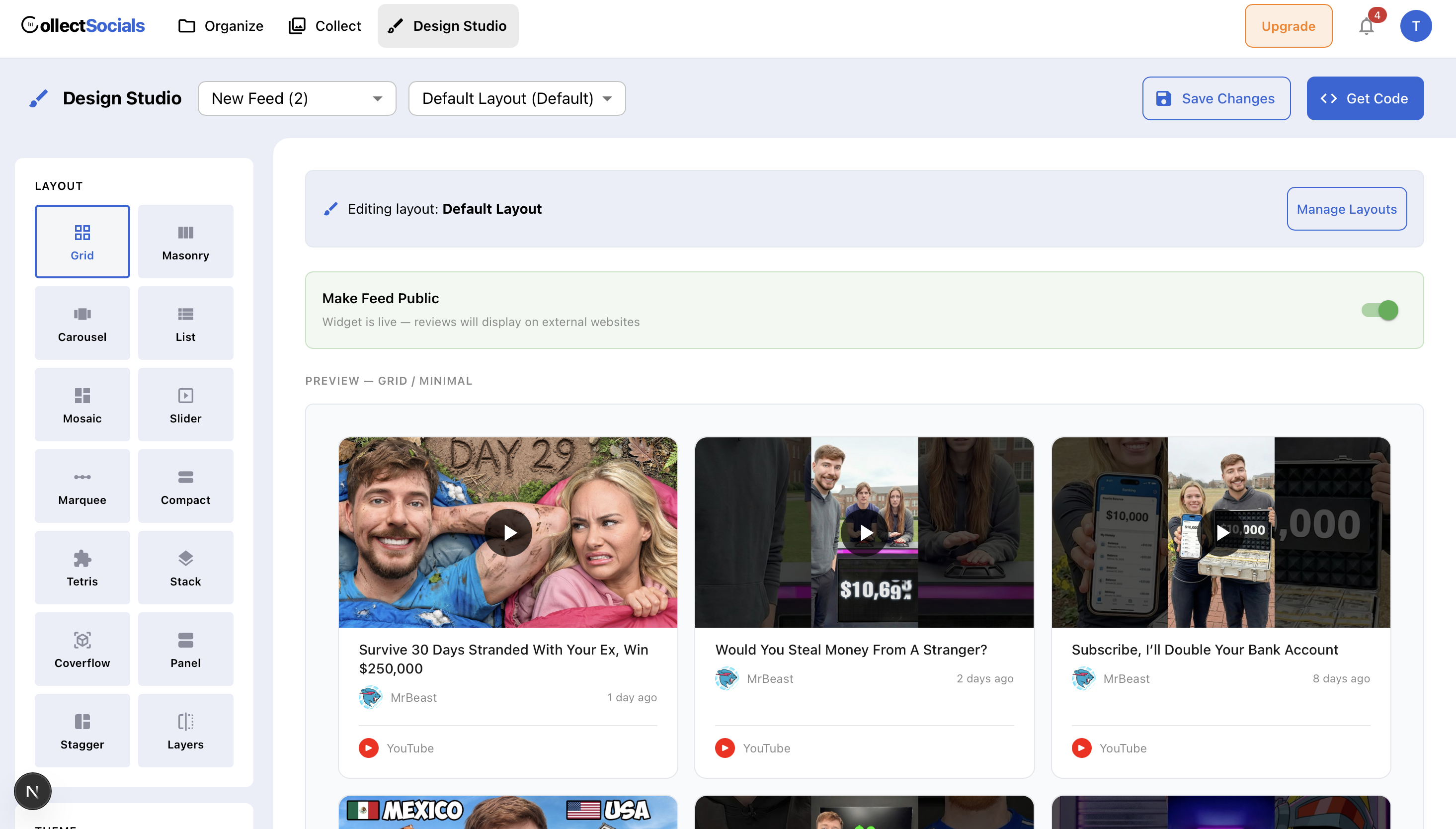
Take a minute to preview your wall. Adjust anything that does not feel right. When you are happy with how it looks, move on to the embed step.
Step 4: Grab Your Embed Code
CollectSocials generates a lightweight embed code — either a JavaScript snippet or an iframe — that you paste into your website.
Click the "Embed" or "Get Code" button in your dashboard. Copy the snippet. It will look something like a short block of HTML with a script tag. This code is what tells your website to load and display your social media wall.
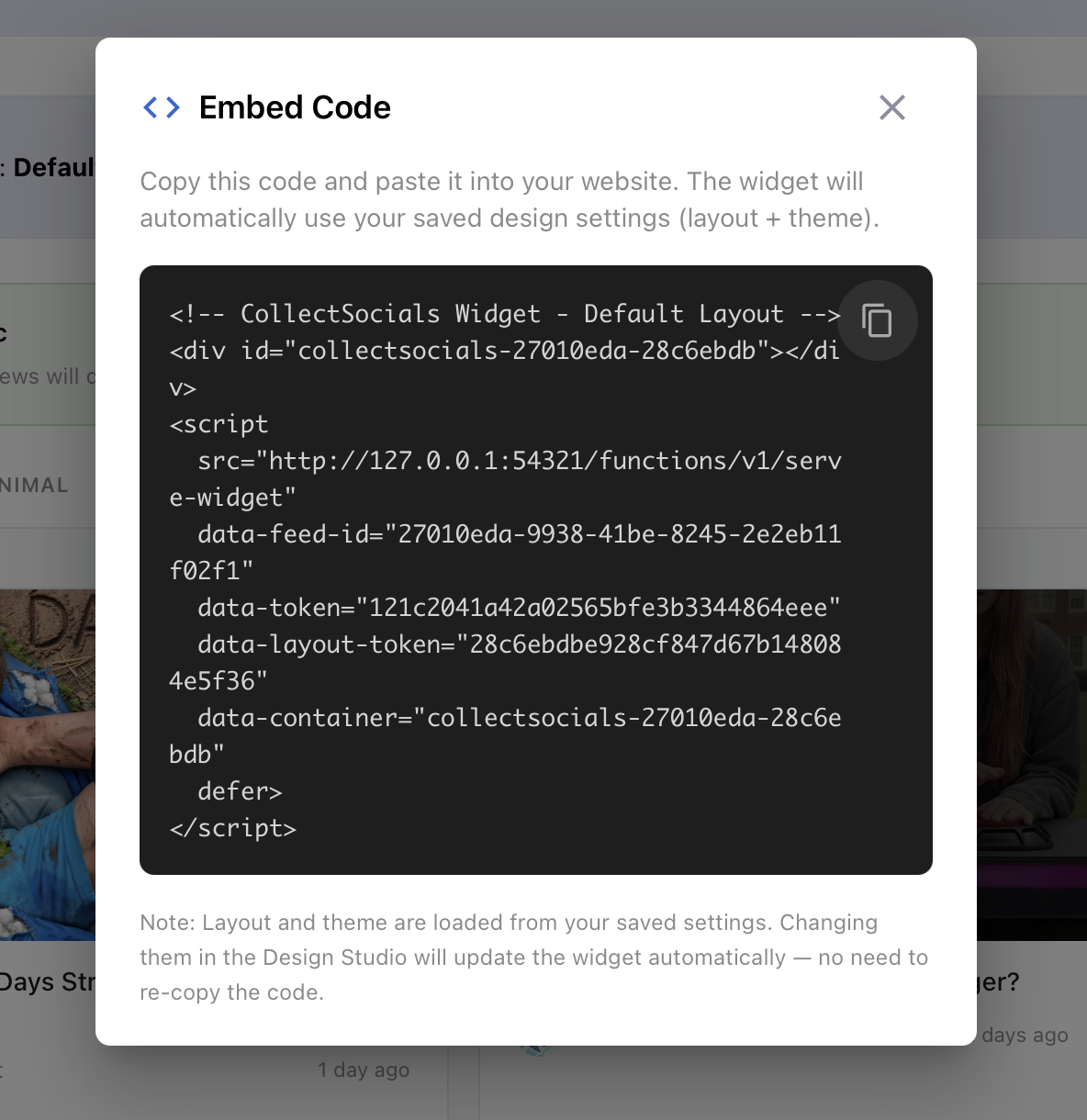
The embed code is responsive by default, meaning it will adapt to whatever screen size your visitors are using — desktop, tablet, or mobile.
Step 5: Paste the Code Into Your Website
This final step varies slightly depending on your platform, but the core idea is identical everywhere: paste the embed code into your page.
WordPress: Open the page or post in the editor. Add a Custom HTML block (in Gutenberg) or switch to the Text tab (in the Classic Editor). Paste the embed code. Hit Update or Publish.
Shopify: Go to Online Store, then Themes, then Customize. Find the section where you want the wall, add a Custom Liquid or Custom HTML block, paste the code, and save.
Squarespace: Open the page editor, add a Code Block, paste the embed code, and save. Make sure "Display Source" is unchecked.
Wix: Use the Embed a Widget or Custom HTML element from the Add menu. Paste the code into the element, adjust the size, and publish.
Webflow: Add an Embed element to your page, paste the code, and publish your site.
Custom HTML site: Open your HTML file, find the section where you want the wall (maybe inside a div on your homepage), paste the code, and upload the file.
That is it. Your social media wall is live.
<!-- Add Custom HTML Block -->
<div id="cs-wall-abc123"></div>
<script src="collectsocials.com/w.js"
  data-feed="abc123" async></script>
One code snippet, any platform
WordPress, Shopify, Squarespace, Wix, or plain HTML. This animation shows a tabbed interface displaying embed code for different CMS platforms. Click a tab (WordPress, Shopify, Squarespace, Wix, HTML) and the code area transitions to show platform-specific instructions. A typing animation fills in the code snippet line by line, followed by a green checkmark confirming it's ready to copy and paste.
The key insight: the core embed code is identical. Whether you're pasting into a WordPress Custom HTML block, a Shopify Liquid section, a Squarespace code block, a Wix HTML widget, or raw HTML before your closing body tag, you're using the same script. The tabs show you where to paste it, but the code itself doesn't change. This universality means you're never locked into a specific platform—migrate your site, and your social wall comes with you.
Tips for Getting the Most Out of Your Social Media Wall
Once your wall is embedded, here are a few things worth doing to maximize its impact.
Place it where it matters. Your homepage is the obvious choice, but do not stop there. Product pages, landing pages, about pages, and even blog sidebars benefit from live social content. A wall on your product page showing customers using your product is more persuasive than any copywriter's tagline.
Use moderation wisely. CollectSocials lets you approve posts before they go live or set keyword filters to automatically exclude content that does not fit your brand. On the Business plan, AI-powered moderation handles this for you. Either way, take a moment to configure moderation so your wall always looks intentional.
Mix your sources. A wall pulling from just one Instagram account is fine, but a wall combining Instagram posts, YouTube videos, TikTok clips, and customer tweets tells a much richer story. This is where having multiple sources pays off — it creates a dynamic, multi-dimensional feed that keeps visitors scrolling.
Let it breathe on the page. Do not cram your social wall into a tiny sidebar. Give it space. A full-width section with generous padding looks professional and invites engagement. Treat it like a design element, not an afterthought.
Why CollectSocials Over Other Aggregators?
You might be wondering why we recommend CollectSocials over other options on the market like Curator.io, Juicer, or Walls.io. A few reasons.
First, the pricing is more accessible. CollectSocials' Pro plan starts at $19/month — roughly 25% less than comparable plans from Curator.io, whose Professional tier starts at $25/month for a similar feature set.
Second, the design quality is noticeably better. The layouts and themes available in CollectSocials are built with a modern design-first approach. Where many aggregators offer a handful of dated templates, CollectSocials provides a growing library of layouts that genuinely look good on contemporary websites.
Third, simplicity. The onboarding flow is intentionally streamlined so that someone with zero technical background can go from signup to a live embed in under five minutes. No confusing feature bloat, no hidden complexity.
And finally, unlimited feeds on every plan — including the free tier. With some competitors, you pay extra for each additional feed or layout. CollectSocials does not limit you that way.
Common Questions
Will this slow down my website?
No. The embed code loads asynchronously, meaning it does not block the rest of your page from rendering. Your site loads normally, and the social wall populates once the page is ready.
Do I need to update the wall manually?
No. CollectSocials automatically fetches new posts from your connected sources based on your plan's refresh rate. Your wall stays current without any effort from you.
Can I use this on more than one page?
Absolutely. You can embed the same feed on multiple pages, or create different feeds for different pages. All plans include unlimited feeds.
What happens if I exceed my page view limit?
On the free plan, your wall pauses after 2,000 monthly page views. Upgrading to Pro (15,000 views) or Business (unlimited views) removes that cap.
The Bottom Line
Embedding a social media wall on your website is one of the highest-impact, lowest-effort changes you can make to improve how visitors perceive and engage with your brand. It turns a static site into something that feels alive — connected to real conversations, real customers, and real content happening across your social channels.
With CollectSocials, the entire process — from account creation to a live social wall on your website — takes less than five minutes. No developer, no coding, no complexity.
Before and after
Static vs alive. This split-screen animation shows the visual impact of adding a social wall. The LEFT side displays a muted, static website section—generic placeholder content, no activity, no proof of real business happening. The RIGHT side shows the same section transformed with a vibrant social media wall that activates: real platform logos (Instagram, X, YouTube, Facebook, Google Reviews), star ratings, and engagement indicators appear in a live grid.
The contrast is deliberate. Websites without social proof feel abandoned—like a store with no customers inside. Websites with active social walls feel credible and current. The right side isn't just prettier; it answers the visitor's unspoken question: "Is this business legitimate?" The Google review stars, the fresh posts, the multi-platform presence—all signal that real people engage with you. This animation captures that before/after moment when a homepage goes from forgettable to trustworthy.
Start Using CollectSocials Today
The social media aggregator built for performance and simplicity — pull from 12+ platforms without sacrificing page speed.